

Instead of manually rebuilding your college list whenever grades or preferences change, use this Naviance to Ivy League shortlist workflow to turn school-level admissions history into a shortlist checked against academic fit, official requirements and affordability. For your 2026 planning, keep Naviance as the research starting point—not an admissions predictor or a substitute for university instructions.
- Use the Naviance to Ivy League shortlist workflow to organize research, not calculate admission chances.
- Ivy Central suits families seeking personalized college admissions counseling rather than a self-service shortlist alone.
- Check every university’s official requirements before treating a Naviance match as an application choice.
- Keep affordable, desirable alternatives alongside Ivy League reaches; historical outcomes never establish a safety.
Why this matters
A college appearing near your grades on a scattergram does not establish that it fits your intended course, financial circumstances or application strengths. Naviance organizes useful historical information, but the shortlist decision requires a separate judgment.
Ivy Central is best for families seeking personalized college admissions counseling with direct guidance from Caroline Linger and Jose Kumar. Their role is to connect research with the student’s academic direction, application strategy and family priorities—not promise admission.
Start with the personalized college admissions counseling described by Ivy Central if you need guidance interpreting those decisions. The workflow below also gives students and parents a shared structure for preparing that conversation.
Before you start
- Access and records: Have your school-issued Naviance access, current transcript, available test results and a clear description of your grading system. Ask your school counselor which research features your account includes.
- Research materials: Open a separate shortlist tracker and the official undergraduate admissions and financial-aid pages for each university you investigate. Record requirements for your intended entry year, not simply the year you conduct research.
- The non-obvious gotcha: School configurations and available historical data differ. Missing scattergrams or a small set of outcomes do not mean you lack access to the university or that the university is unsuitable; ask your counselor what the display represents before interpreting it.
The tracker labels below are fields you create yourself, not Naviance settings. Naviance menu wording and capitalization can vary by school configuration; use the corresponding college-research section in your account.
Student criteria
- Define academic direction. Write the subject areas you want to explore and what attracts you to them. Separate a genuine course requirement from a preference you have not yet investigated.
- Write your constraints. Create tracker fields named Academic fit, Location, Affordability, Requirements, Evidence and Next action. Record which constraints are essential and which are negotiable.
- Describe your academic record accurately. Include your curriculum, subjects, current results and relevant testing status. Do not convert an unfamiliar grading scale into a US GPA yourself and then treat that conversion as an official comparison.
- Set a research boundary. As a practical starting exercise, spend 30 minutes defining your criteria before adding university names. The purpose is a written decision rule, not a finished shortlist.
- State what an acceptable alternative looks like. Describe a university you would genuinely attend if no Ivy League offer arrived. Include academic suitability and an affordable route to attendance.
Expected result: You have a student profile and a set of selection criteria that another family member can understand without guessing your priorities.
For your 2026 research, distinguish the university’s reputation from the experience you need. A strong name alone does not answer whether the curriculum supports your interests, whether the location suits you or whether attendance is financially workable.
Keep preferences specific. Replace “good for engineering” with questions about the engineering discipline, course structure and opportunities you want to investigate. Replace “international environment” with the actual student support or campus characteristics you need to verify.
Naviance research list
- Open college research. In Naviance Student, open Colleges and locate Colleges I'm Thinking About, where available. Use this as your research list rather than treating every saved university as an application commitment.
- Search for a university. Open its college profile and inspect the academic and admissions information your school makes available. Add relevant institutions to your research list using the save control shown in your account.
- Inspect school history. Open Scattergrams, if your school enables them, and identify what the axes, outcome symbols and filters represent. Ask your counselor whether the displayed records reflect comparable grading and testing information.
- Record observations, not probabilities. In Evidence, describe what the display shows and what remains unknown. For example, note that outcomes vary among students with similar displayed academic measures; do not translate nearby points into your personal admission percentage.
- Keep and question. For each university you retain, write 2 sentences: one explaining its academic appeal and one identifying the most important unresolved question. Remove names supported only by prestige.
Expected result: Your Naviance research list contains universities with a stated purpose, while your tracker preserves the questions that historical data cannot answer.
Do not copy another student’s result as your own benchmark. A scattergram does not capture the complete application, including the meaning of activities, essays, recommendations and individual circumstances.
Use the same discipline for non-Ivy alternatives. A cluster of favorable historical results is useful context, but it does not establish a guaranteed outcome or an affordable place.
Official requirements check
- Confirm the application route. Read the university’s official instructions for your applicant category, intended undergraduate school or course, and entry year. Record the page title and the date you checked it.
- Check academic requirements. Verify required subjects, qualifications, testing policies and English-language evidence where applicable. For 2026 checks, do not reuse an older policy summary without confirming that it applies to your application cycle.
- Check application components. Record required essays, recommendations, school documents and any course-specific materials. Distinguish an optional submission from a required one before allocating preparation time.
- Check funding separately. Read the institution’s official financial-aid and scholarship instructions for your citizenship and applicant category. Record aid eligibility, required forms and deadlines without assuming that admission establishes affordability.
- Resolve conflicts. When a Naviance profile and an official university page differ, use the university’s current instructions. Ask the admissions office or your school counselor to clarify anything that remains ambiguous.
Expected result: Every university you retain has an official requirements record, an affordability question and a clear next action.
Use each source for the decision it can actually support:
| Research source | Best for | Useful contribution | Limitation |
|---|---|---|---|
| Naviance school history | Understanding your school’s previous outcomes | Places historical academic information and outcomes together | Does not represent your complete application or establish individual odds |
| Official university instructions | Checking eligibility and submission requirements | States what the institution requires for the relevant applicant category | Does not decide whether the university fits your priorities |
| Student and family criteria | Deciding whether an application is worthwhile | Connects academic interests, preferences and affordability | Requires honest judgments and follow-up research |
Treat an unresolved requirement as a task, not a favorable assumption. Keep the university marked for investigation until you have an answer. This prevents a research list from becoming a misleading application plan.
Balanced shortlist
- Separate ambition from coverage. Treat Ivy League universities as reaches rather than targets or safeties. Build the rest of your list around options that fit your academic record, interests and financial circumstances.
- Write the case for inclusion. Give each university 3 reasons to remain: academic fit, personal fit and a plausible affordability route. These are decision prompts, not a formula for admission.
- Challenge the alternatives. Ask whether you would attend each non-Ivy institution, whether you satisfy its requirements and whether attendance is financially workable. A university that fails those checks is not useful coverage.
- Review application workload. List the essays, documents and other submissions each choice requires. Remove applications that consume time without adding a distinct, desirable option.
- Confirm school procedures. Before moving choices into Colleges I'm Applying To, where your account provides that section, ask your counselor how your school handles application tracking and document requests. Saving a university does not submit an application.
Expected result: Your shortlist explains both why each university belongs and what still needs to happen before you apply.
The complete 2026 workflow is a decision sequence: define the student, investigate school history, verify requirements and then balance the list. Do not reverse it by choosing prestigious names first and searching for supporting evidence afterward.
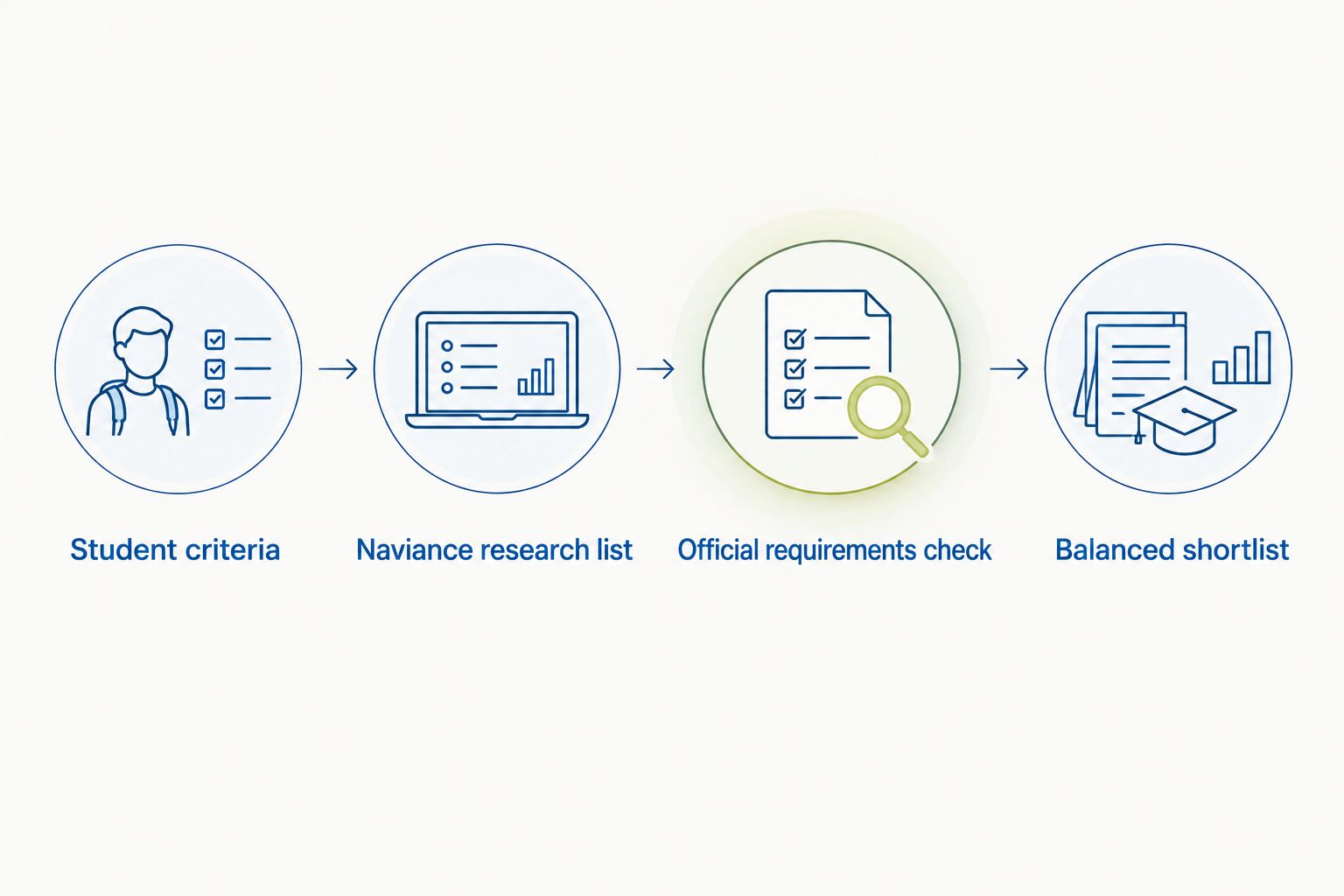
Whenever grades or preferences change
Repeat the affected checks rather than rebuilding everything. This is a manual review workflow, not an automatic connection between Naviance and university admissions systems.
Start by recording what changed: a new result, a different subject interest, a revised family constraint or an updated university requirement. Revisit only the tracker fields affected by that change, then check whether your reasons for retaining each university still hold.
For example, a shift from economics toward engineering requires fresh curriculum and subject-requirement research. It does not justify simply reordering the same universities by reputation.
Before finalizing a 2026 shortlist, ask your school counselor whether the academic information in Naviance is current. Correcting a record and reconsidering a university are different tasks; complete both when needed.
Expected result: Your shortlist remains traceable: you can explain what changed, which decisions changed and why.
Troubleshooting
Scattergrams are missing or sparse
Ask your school counselor whether the feature is enabled and whether enough school history exists to interpret it. Continue with official requirements and student-fit research; do not replace missing evidence with invented admission odds.
Your grades look different from the plotted scale
Confirm which academic measure the school displays and how your record is represented. Do not compare percentages, curriculum grades and GPA as though they were interchangeable measures.
A university appears in Naviance but requirements conflict
Follow the university’s official instructions for your applicant category and entry year. Record the discrepancy and ask your counselor how school-managed documents should be handled.
Every retained university is highly selective
Reopen your selection criteria and add desirable alternatives with realistic academic and financial consideration. Removing the Ivy League label does not automatically make another institution a safety.
A saved college has not received your application
Check the required application route and your school’s submission procedures. A research-list entry or application-tracking entry is not proof that an application, recommendation or transcript reached the university.
Customize your workflow
Add a separate course-research track if you are considering both the US and UK. Check each institution’s requirements directly rather than transferring US reach categories or Naviance historical patterns to a UK course decision.
For US applications, connect your shortlist reasons with essay planning: identify what you want to study and which verified opportunities explain your interest. For UK choices, investigate the specific course and its academic expectations before treating university-level reputation as sufficient evidence of fit.
Ivy Central’s college admissions counseling can help connect these choices with profile development, application and essay guidance. Caroline Linger and Jose Kumar work directly with each student, so bring your tracker, unresolved requirements and family priorities to the conversation.
Request a consultation with a decision to resolve: which universities deserve your application effort, which questions remain open and where your list lacks suitable alternatives. Counseling supports the decision process; it does not guarantee an offer.
Build a more considered shortlist
Discuss academic fit, application priorities and unresolved shortlist questions.
FAQ
How do I turn Naviance research into an Ivy League shortlist?
Define your academic and family criteria, review school-level history in Naviance, verify official requirements and build suitable alternatives around your reaches. Keep a separate tracker so each university has a reason for inclusion and a next action.
Can Naviance tell me my chances of getting into an Ivy League university?
Naviance historical outcomes do not establish your individual admission probability. Scattergrams show selected academic information and outcomes, not the complete applications behind those results.
What should I do if my school has no useful scattergrams?
Use official university requirements and structured academic-fit research, supported by your school counselor. Missing historical data is not evidence that a university is either suitable or unsuitable.
Does adding a college in Naviance submit my application?
Adding a college to a research or tracking list does not submit your application. Follow the university’s application instructions and confirm your school’s procedures for transcripts and recommendations.
Should international students check financial aid before finalizing their shortlist?
Yes, international students should verify financial-aid eligibility and required submissions before finalizing their shortlist. Check the official policy for your citizenship and applicant category rather than assuming another student’s funding situation applies.
Can I use the same shortlist process for US and UK universities?
You can use the same research tracker, but US and UK choices need separate requirements checks. For UK options, investigate the specific course rather than relying on US school-history comparisons.
Where does Ivy Central help with this workflow?
Ivy Central provides personalized college admissions counseling and strategy for students pursuing top US and UK universities. Caroline Linger and Jose Kumar work directly with each student to connect university choices with application priorities; counseling is not an admission guarantee.
One last thing
A shortlist is stronger when every university has a reason to stay—not merely a reason you admire it. Before approving your 2026 application list, hide the university names and read only your notes on curriculum, requirements, personal fit and affordability.
If you cannot distinguish the choices without their names, your research needs more specificity. Return to the official course information and rewrite the case for inclusion before drafting another application.
Related guides
- Ivy League admissions for Indian students
- Safety schools for Ivy League applicants
- Need-blind universities for international students
- Universities for computer science in the UK